On this page
- Popups vs Announcement Bars: The Core Conversion Goal Difference
- How Do Announcement Bars and Popups Compare on Shopify UX and SEO?
- The Strategic Roadmap: When to Use Each Tool on Your Shopify Store
- How to A/B Test Your Shopify Popup vs Announcement Bar Strategy
- What Shopify Merchants Get Wrong About User Experience
- What To Do Next in Your Shopify Optimization Journey
- Freequently Asked Questions
The modern Shopify merchant is constantly playing a delicate game of balance: Aggression vs Friction.
You need to be aggressive enough to capture a lead or boost an Average Order Value (AOV), but subtle enough not to create friction that causes a customer to abandon their session entirely.
This strategic tension is the difference between an Announcement Bar and a Popup. They are not interchangeable. One is a whisper of information; the other is a shout for action. Using the wrong one for your goal is the quickest way to annoy your customer base, damage your site’s performance, and waste your conversion budget.
This guide is for the scaling Shopify brand that understands the basics and needs an expert strategic framework to stop guessing and start converting with confidence.
Use announcement bars for passive, site-wide information like shipping thresholds or return deadlines. Use Popups (modals) for active, high-value lead generation and conversion tactics, such as time-sensitive coupon offers or high-converting email capture.
Key Takeaways
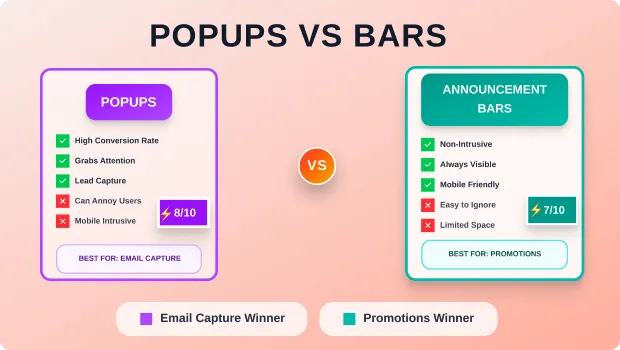
- Announcement Bars (Low-Friction): Ideal for site-wide awareness (free shipping, deadlines, simple notices). High visibility, low conversion impact, minimal UX friction.
- Popups/Modals (High-Friction): Essential for targeted action (email capture, coupon sign-up, exit intent). Low visibility (only shown to a segment), high conversion impact, higher UX friction risk.
- The Deciding Factor: If your goal is Awareness (information), use the Bar. If your goal is Action (email opt-in, coupon code), use the Popup.
- SEO/UX: Bars have a minimal impact on Core Web Vitals. Popups, especially on mobile, can negatively affect Cumulative Layout Shift (CLS) if not correctly timed.
Popups vs Announcement Bars: The Core Conversion Goal Difference
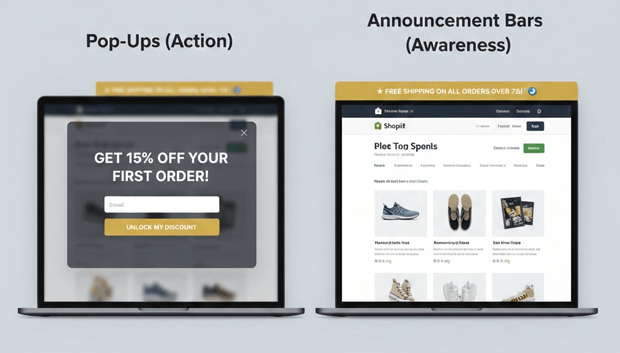
The foundational error many Shopify merchants make is treating the bar and the Popup as simply different design styles. They are fundamentally different tools, built for different phases of the customer journey.
Why Announcement Bars Are for Awareness and Popups are for Action
| Feature | Announcement Bar (The Whisper) | Popup / Modal (The Shout) |
| Primary Goal | Awareness: Communicating store-wide status updates. | Action: Securing an immediate, high-value commitment. |
| Friction Level | Low. Non-intrusive, sticky to the top/bottom. | High. Blocks content, requires a click to close/interact. |
| Ideal Use-Case | Free shipping thresholds, holiday deadlines, simple sales announcements, return policy changes. | Email/SMS opt-in, immediate discount/coupon offer, exit-intent recovery. |
| Targeting | Store-wide (All pages, all users). | Highly targeted (Specific pages, time-delay, exit-intent, new vs returning). |
| Conversion Rate | Low (Tracked by CTR on a link within the bar). | High (Tracked by Opt-in Rate/CPA). |
Strategic Rule: When you need a customer to take a distinct action—enter their email, click a button for a coupon, or confirm a choice—you need the focused, non-skippable nature of a Popup. When you need them to simply know something throughout their entire session, use the Announcement Bar.
Recommended Blogs for You:
👉 What Are Sales Popups? How Real-Time Social Proof Increases Shopify Conversions
👉 Shopify Wishlist Psychology: Why “Save for Later” Increases Revenue
👉 How to Add a Free Shipping Progress Bar in Shopify: The Ultimate Guide for Increasing AOV
👉 Shopify Checkout Page Optimization for Upsells & Post-Purchase Offers
How Do Announcement Bars and Popups Compare on Shopify UX and SEO?
In the current landscape of modern Core Web Vitals (CWV), SEO and user experience (UX) are inseparable. A tool that drives conversions but hurts your search ranking is not a winning strategy.
Popups, also called modals or interstitials, are notoriously difficult to load without creating layout shifts. Google’s Cumulative Layout Shift (CLS) metric measures unexpected layout shifts. A poorly optimized Popup that suddenly appears and pushes the page content down (or covers it without correct CSS positioning) will directly harm your CLS score. To execute a high-impact pop-up strategy while maintaining top-tier user experience and SEO health, strategic app selection is crucial. Apps like SalesPulse – Sales Pop Up give you the essential controls to win the conversion game without incurring penalties: The strategic decision is always goal-driven. Here are two critical merchant goals and the definitive tool choice for each. The most common and most effective use of a Popup is for email capture. An email address is a high-value asset, which justifies the high-friction interruption. The most effective use of an announcement bar is to communicate a free shipping threshold, which directly boosts Average Order Value (AOV). A strategic CRO expert never runs both tools for the same goal simultaneously. This pollutes your data. You must A/B test the tool type itself. The key to a successful test is not just tracking the opt-in rate; it’s tracking the downstream business impact. The A/B Test Setup: Segment 50% of your traffic to Test A (Exit-Intent Popup) for email capture. Segment the other 50% to Test B (Footer Announcement Bar) with the same email capture copy. After 2–3 weeks, the test with the highest positive ROI wins the placement. You need an app that lets you use a smaller, less obtrusive, slide-out-from-bottom style for mobile, even if you use a full-screen modal on desktop. A full-screen Popup on a small mobile device is a guaranteed source of frustration, negative feedback, and potential SEO/CLS issues. Showing an email Popup 0–1 seconds after the page loads is an act of digital hostility. The customer hasn’t had time to determine if your site is even worth their email. The recommended minimum delay is 5 seconds. The best delay is exit intent or after the user has scrolled 30% of the page. If your free shipping bar is static (“Free shipping on all orders over $75”), you are wasting the space. A high-converting free shipping bar must be dynamic, showing the customer exactly how much more they need to spend to qualify. This leverages psychological triggers to increase your AOV. The decision between an announcement bar and a Popup boils down to the strategic impact you want to have on the user journey. Once you’ve implemented your chosen tool, your next step should be moving beyond the setup and into Conversion Rate Optimization (CRO) . This means: This continuous optimization is what separates a scaling Shopify store from a stagnant one. Popups can hurt your SEO ranking, primarily by impacting Core Web Vitals metrics like Cumulative Layout Shift (CLS) and Largest Contentful Paint (LCP). Google discourages full-page interstitial Popups on mobile devices, especially when they block content immediately upon page load. Exit-intent Popups are generally safer for SEO. A high-performing email Popup on a Shopify store should achieve an opt-in rate between 3% and 5%. If your rate is consistently below 2%, the Popup offer, copy, or timing needs to be optimized to provide better value to the user. No. While an announcement bar can communicate the BOGO offer, the goal is immediate, high-friction action. A Popup or modal is more effective for BOGO offers as it demands attention and can provide the necessary coupon code or call-to-action link immediately. Yes, free shipping bars are highly effective for increasing Average Order Value (AOV). By dynamically showing customers how close they are to a spending threshold, they leverage the psychological principle of loss aversion, encouraging users to add low-cost items to their cart to avoid paying for shipping.Visual Comparison: Popups vs Announcement Bars for Key Shopify Goals
Shopify Goal Recommended Tool Why It Wins Strategically Ideal Trigger/Placement Increase AOV Announcement Bar Less intrusive communication of “Spend $X more for Free Shipping.” Always visible, reminds them constantly. Top of the screen, session-wide, on Collection/Product pages. Lead Capture (Email) Popup The high-friction is necessary for a high-value action. The customer must commit to the opt-in. Exit-Intent (Desktop) or 8-12 second delay (Mobile). Urgency/Scarcity Popup Countdown timers on bars are easy to ignore. A modal Popup demands attention and immediate action, driving urgency. 5-10 second delay on a Product Page with low conversion. Site-Wide Announcement Announcement Bar Simple notices (e.g., “Warehouse closed on Jan 1st”). Max reach, zero intrusion. Top of the screen, session-wide. Which Tool Impacts Core Web Vitals (CLS/LCP) More: The Bar or the Popup?
The Expert Recommendation:
The Strategic Roadmap: When to Use Each Tool on Your Shopify Store
When Should You Use a High-Friction Popup on Shopify? (For Email Capture)
When Should You Use a Low-Friction Announcement Bar? (For Free Shipping)
How to A/B Test Your Shopify Popup vs Announcement Bar Strategy
What Conversion Rate Optimization (CRO) Metrics Should You Be Tracking?
What Shopify Merchants Get Wrong About User Experience
1. The Mobile Overlay Mistake
2. The “Immediate Popup” Fiasco
3. The “Free Shipping Bar is Just a Banner” Failure
What To Do Next in Your Shopify Optimization Journey
Freequently Asked Questions
Do Popups hurt your SEO ranking on Shopify?
What is the ideal opt-in rate for an email Popup on a Shopify store?
Should I use an announcement bar for a BOGO (Buy One Get One) offer?
Are free shipping bars effective for increasing Average Order Value (AOV)?