
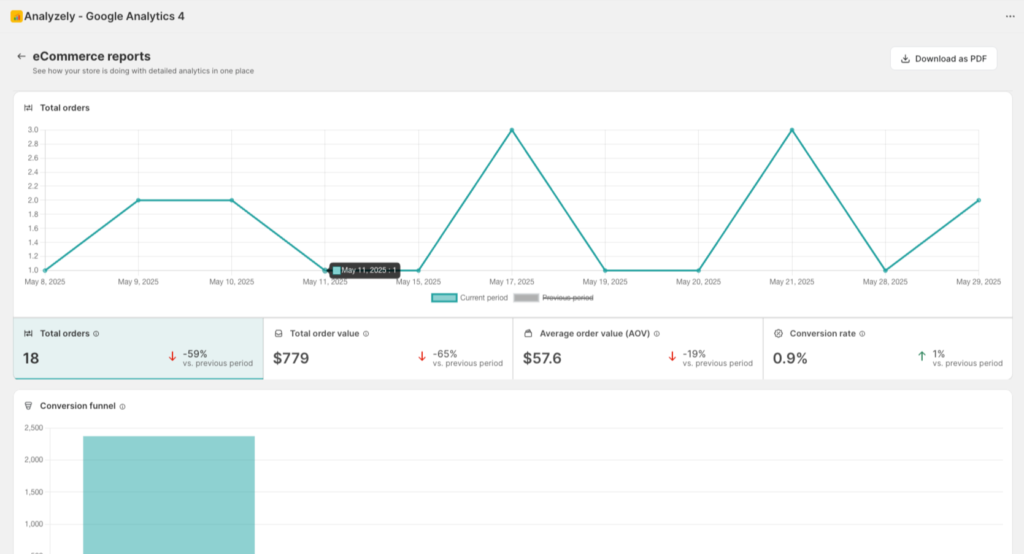
Conversion Metrics
Conversion Rate
Definition: Percentage of sessions that resulted in a purchase.
Calculation: (Transactions / Sessions) x 100
Benchmarks:
| Industry | Typical Rate |
|---|---|
| Fashion | 1.5% – 2.5% |
| Electronics | 1% – 2% |
| Beauty | 2% – 3% |
| Home & Garden | 1.5% – 2% |
Cart Abandonment Rate
Definition: Percentage of carts created but not purchased.
What it tells you:
- Checkout friction points
- Pricing or shipping concerns
- User experience issues
Reducing abandonment:
- Simplify checkout process
- Offer multiple payment options
- Display shipping costs early
- Send abandonment emails
Purchase Funnel Analysis
The purchase funnel shows how customers move through the buying process:
| Stage | Description |
|---|---|
| Sessions | All store visits |
| Product Views | Visitors who viewed products |
| Add to Cart | Visitors who added items to cart |
| Checkout Started | Visitors who began checkout |
| Purchases | Completed transactions |
Interpreting the Funnel
Drop-off between Product View and Add to Cart:
- Price concerns
- Poor product images
- Missing information
- Out of stock items
Drop-off between Add to Cart and Checkout:
- Shipping cost surprise
- Registration required
- Limited payment options
Drop-off between Checkout and Purchase:
- Complex checkout
- Trust concerns
- Payment failures
Top Selling Products
This section shows your best-performing products:
| Column | Description |
|---|---|
| Product Name | Name of the product |
| Quantity Sold | Number of units sold |
| Revenue | Total revenue from product |
| Views | Number of product page views |
Using This Data
- Inventory planning: Stock up on bestsellers
- Marketing focus: Promote top performers
- Pricing strategy: Test pricing on high-demand items
- Cross-selling: Suggest top products on other pages
Revenue by Category
See how different product categories perform:
| Column | Description |
|---|---|
| Category | Product collection or type |
| Revenue | Total revenue from category |
| Transactions | Number of orders with category items |
| Share | Percentage of total revenue |
Using This Data
- Collection optimization: Improve low-performing categories
- Seasonal planning: Track category trends
- Marketing allocation: Focus on high-revenue categories
Revenue by Traffic Source
Understand which channels drive the most valuable traffic:
| Column | Description |
|---|---|
| Source | Traffic origin (organic, paid, social, etc.) |
| Revenue | Total revenue attributed |
| Transactions | Number of purchases |
| Conversion Rate | Source-specific conversion rate |
Using This Data
- ROI calculation: Compare ad spend to revenue
- Channel investment: Increase spend on high-converting sources
- Content strategy: Create content for valuable channels
Best Practices for eCommerce Reports
Regular Review Schedule
| Frequency | Focus Areas |
|---|---|
| Daily | Revenue, transactions, any anomalies |
| Weekly | Conversion rates, top products, funnel |
| Monthly | All metrics, trends, source analysis |
Key Questions to Answer
- Is revenue growing? Compare to previous periods
- What drives purchases? Review top products and sources
- Where do customers drop off? Analyze the funnel
- Which traffic is most valuable? Check revenue by source
- How can I increase AOV? Review product performance
Actions Based on Data
| Finding | Action |
|---|---|
| Low conversion rate | Optimize product pages, simplify checkout |
| High cart abandonment | Add cart recovery emails, reduce friction |
| Single product dependency | Diversify bestsellers, improve other products |
| Traffic not converting | Improve targeting, landing page optimization |
| Declining AOV | Implement upselling, create bundles |
Understanding Data Accuracy
Event Tracking Requirements
For accurate eCommerce data, ensure these events are enabled:
| Event | Required For |
|---|---|
| View Product | Product views, funnel top |
| Add to Cart | Cart metrics, funnel middle |
| Initiate Checkout | Checkout starts, funnel |
| Purchase | Revenue, transactions, conversions |
Server-Side Events
For the most accurate purchase data:
- Enable Server-Side Events in Analytics Setup
- Configure the Measurement Protocol API Secret
- Server-side events are not blocked by ad blockers
See Server-Side Tracking for setup instructions.
Data Discrepancies
Revenue in Analyzely may differ from Shopify reports because:
- Timing: GA4 data can have 24-48 hour delays
- Attribution: Different attribution models
- Tracking: Some transactions may not be tracked (blocked scripts)
- Currency: Exchange rate timing differences
Troubleshooting
No Revenue Data
- Verify Purchase event is enabled
- Check that actual purchases have been made
- Confirm event tracking is working (check Realtime in GA4)
- Wait 24-48 hours for data processing
Conversion Rate Shows 0%
- Ensure sessions are being tracked
- Verify Purchase event fires correctly
- Check for tracking script blockers
- Test with a real purchase
Products Not Showing
- Enable View Product event
- Verify product page template has tracking
- Check product data layer configuration
- Test by viewing products in your store